---
title: Conversion Rate by Player
description: View conversion rates across podcast players based on player impression data
---
[Skip to content](https://help.adanalytics.spotify.com/conversion-rate-by-player#main-content)
![SpotifyAdvertising\_Logo\_Black.png\]](https://help.adanalytics.spotify.com/hs-fs/hubfs/SpotifyAdvertising_Logo_Black.png?height=28&name=SpotifyAdvertising_Logo_Black.png)
Open main navigation
Close main navigation
- [Go to ads.spotify.com](https://adanalytics.spotify.com/)
[Go to ads.spotify.com](https://adanalytics.spotify.com/)
Hi. How can we help?
- There are no suggestions because the search field is empty.
1. [Ad Analytics Help Center](https://help.adanalytics.spotify.com/?hsLang=en)
2. [Understanding Performance](https://help.adanalytics.spotify.com/understanding-performance?hsLang=en)
3. [Analyze Campaign](https://help.adanalytics.spotify.com/understanding-performance?hsLang=en#analyze-campaign)
# Conversion Rate by Player
## View conversion rates across podcast players based on player impression data
Applies to: Brands, Agencies, and Publishers
**Note**: Reporting Campaigns, and any campaign beginning prior to January 2023, are not eligible to view Conversion Rates by Player, but can still view Impressions and Reach by Player.
### **What is Conversion Rate by Player?**
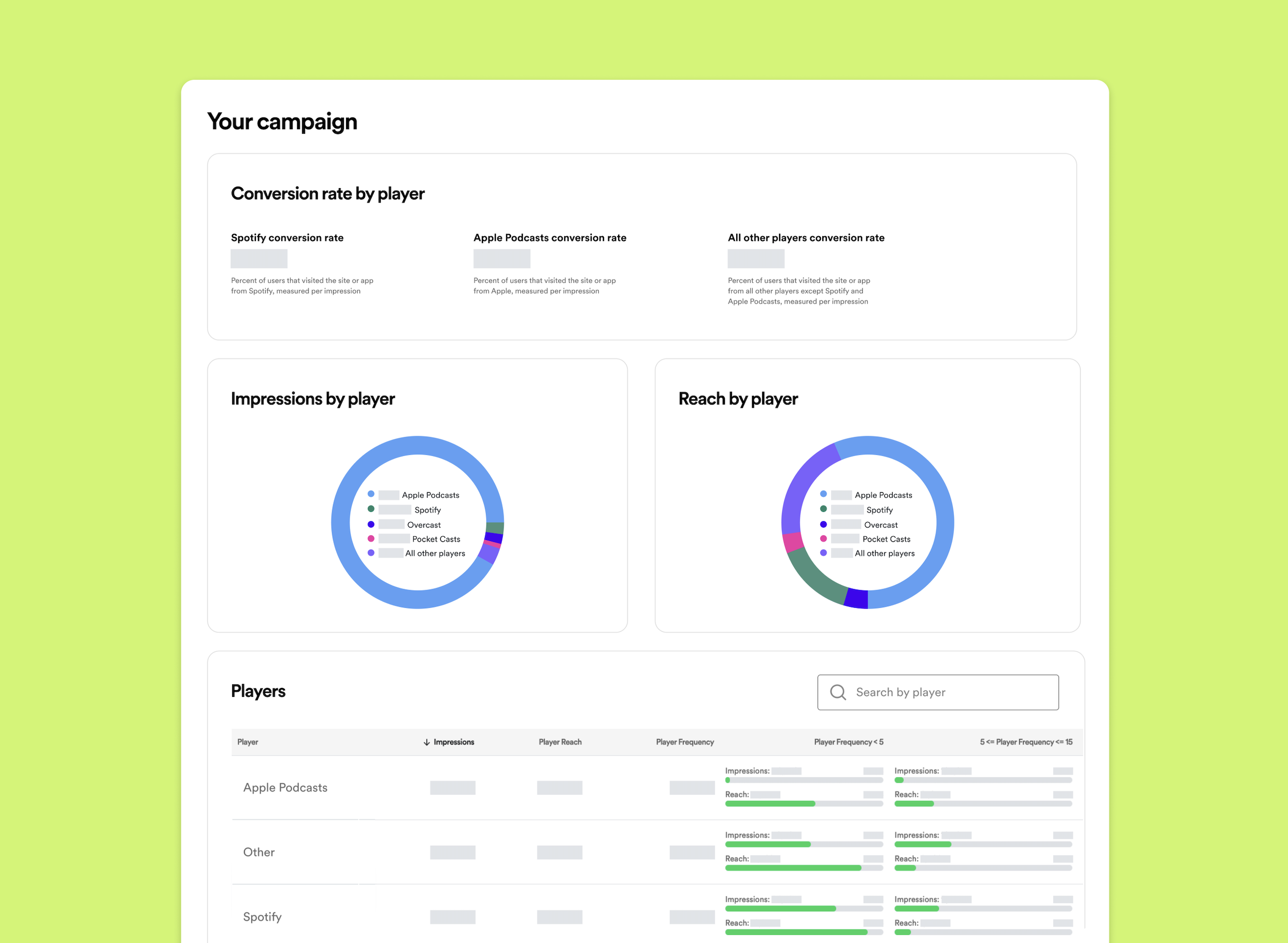
On a campaign-level, Conversion Rate by Player is a metric designed to help you view and compare conversion rates, impressions, and reach across each podcast player. This data breakdown is available for all attribution campaigns for dynamic ad placements only (not embedded). Player information is gathered directly from the User Agent. Read more on User Agents [here](https://help.adanalytics.spotify.com/about-data-collection-for-attribution?hsLang=en).
### **Where can I find Conversion Rates by Player?**
This new metric is located in the **Players** tab within your campaign overview. Navigate to **Measure \> Campaigns** and select the campaign you'd like to view, then click **Players**.
### What information is available with this metric?
- **Conversion Rate by Player**: A conversion rate specific to each podcast players (e.g., Spotify, Apple, etc.) calculated by impression
- **Player reach**: Number of unique user agent and IP pairs that downloaded an episode on a specific podcast player
- **Player frequency**: Number of times a unique user agent and IP pair was exposed to an ad on a specific podcast player
- [About](https://help.adanalytics.spotify.com/about?hsLang=en#main-content)
- [About Spotify Ad Analytics](https://help.adanalytics.spotify.com/about?hsLang=en#about-spotify-ad-analytics)
- [About The Spotify Pixel](https://help.adanalytics.spotify.com/about?hsLang=en#about-the-spotify-pixel)
- [About Attribution Methodology](https://help.adanalytics.spotify.com/about?hsLang=en#about-attribution-methodology)
- [About Privacy & Legal](https://help.adanalytics.spotify.com/about?hsLang=en#about-privacy-legal)
- [About FAQs](https://help.adanalytics.spotify.com/about?hsLang=en#about-faqs)
- [Getting Started](https://help.adanalytics.spotify.com/getting-started?hsLang=en#main-content)
- [1. Sign Up & Membership](https://help.adanalytics.spotify.com/getting-started?hsLang=en#1-sign-up-membership)
- [2. Manage Dashboard Settings](https://help.adanalytics.spotify.com/getting-started?hsLang=en#2-manage-dashboard-settings)
- [3. Install the Spotify Pixel](https://help.adanalytics.spotify.com/getting-started?hsLang=en#3-install-the-spotify-pixel)
- [4. Verify Pixel Installation](https://help.adanalytics.spotify.com/getting-started?hsLang=en#4-verify-pixel-installation)
- [5. Add Podcasts and Install the RSS Prefix](https://help.adanalytics.spotify.com/getting-started?hsLang=en#5-add-podcasts-and-install-the-rss-prefix)
- [3P Integrations](https://help.adanalytics.spotify.com/getting-started?hsLang=en#3p-integrations)
- [Spotify Integrations - Megaphone](https://help.adanalytics.spotify.com/getting-started?hsLang=en#spotify-integrations-megaphone)
- [Getting Started FAQ & Troubleshooting](https://help.adanalytics.spotify.com/getting-started?hsLang=en#getting-started-faq-troubleshooting)
- [Spotify Integrations - Spotify Ads Manager](https://help.adanalytics.spotify.com/getting-started?hsLang=en#spotify-integrations-spotify-ads-manager)
- [Support](https://help.adanalytics.spotify.com/support?hsLang=en)
- [Campaigns](https://help.adanalytics.spotify.com/campaigns?hsLang=en#main-content)
- [Build a Campaign](https://help.adanalytics.spotify.com/campaigns?hsLang=en#build-a-campaign)
- [Ready for Launch](https://help.adanalytics.spotify.com/campaigns?hsLang=en#ready-for-launch)
- [Campaigns FAQs & Troubleshooting](https://help.adanalytics.spotify.com/campaigns?hsLang=en#campaigns-faqs-troubleshooting)
- [Understanding Performance](https://help.adanalytics.spotify.com/understanding-performance?hsLang=en#main-content)
- [Analyze Campaign](https://help.adanalytics.spotify.com/understanding-performance?hsLang=en#analyze-campaign)
- [Conversion Lift](https://help.adanalytics.spotify.com/understanding-performance?hsLang=en#conversion-lift)
- [Spotify Brand Lift](https://help.adanalytics.spotify.com/understanding-performance?hsLang=en#spotify-brand-lift)
- [Reports](https://help.adanalytics.spotify.com/understanding-performance?hsLang=en#reports)
- [Understand Performance Troubleshooting & FAQs](https://help.adanalytics.spotify.com/understanding-performance?hsLang=en#understand-performance-troubleshooting-faqs)
- [Account and Campaign Access](https://help.adanalytics.spotify.com/account-and-campaign-access?hsLang=en#main-content)
- [Account Membership](https://help.adanalytics.spotify.com/account-and-campaign-access?hsLang=en#account-membership)
- [Agency Access](https://help.adanalytics.spotify.com/account-and-campaign-access?hsLang=en#agency-access)
- [Spotify Pixel](https://help.adanalytics.spotify.com/spotify-pixel?hsLang=en)
[](http://adanalytics.spotify.com)
Go to [ads.spotify.com](https://ads.spotify.com/en-US/ad-analytics/) [Terms of Service](https://www.spotify.com/us/legal/ad-analytics-terms/) [Privacy Policy](https://www.spotify.com/us/legal/ad-analytics-privacy-policy/) Copyright © 2026